


AcuRite Weather Station with Jumbo Display
Item # 1044232


Spend $49.99 to unlock free delivery!
Get everything you need



Neighbor’s Club Members earn points with purchases.
Spend $49.99 to unlock free delivery!
Out of stock at
Grassland (franklin) TN
Delivery to
Pickup Nearby at OLD HICKORY TN(24.1) miles FREE
Free standard delivery on online footwear & Clothing purchases of $49 and over.
Get everything you need
Neighbor’s Club Members earn points with purchases.
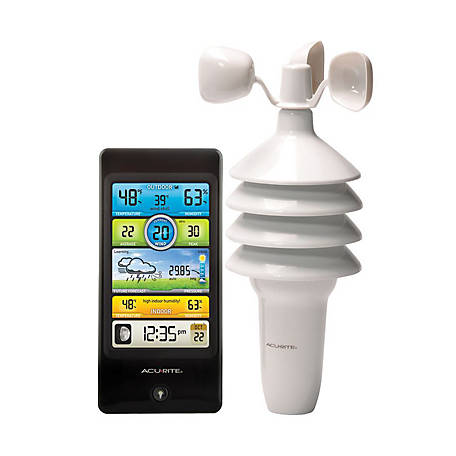
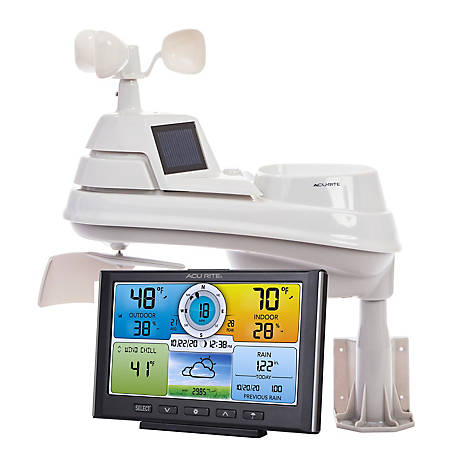
Looking for a reliable home weather station? Get the AcuRite Weather Station with Jumbo Display. This indoor/outdoor weather monitor offers a wide range of weather data, including temperature with high/low readings and a calendar. Plus, this digital thermometer has a jumbo LCD for easy viewing.One-Year Limited Warranty
For additional information on this product, please see the Product Documents section for all downloadable user manuals, installation guides, brochures and warranty statements.
- Bold, easy-to-read LCD display includes indoor/outdoor temperature with daily high/low readings
- Home weather station uses patented Self-Calibrating Technology to provide your personal forecast of 12 to 24 hour weather conditions
- Digital thermometer also shows calendar and atomic clock for added convenience
| Brand | AcuRite |
|---|---|
| Country of Origin | Imported |
| Display Type | LCD |
| Features | Indoor/Outdoor Temperature, weather forecast, clock, date, day |
| Maximum Temperature | 158 deg. |
| Maximum Transmission Range | 330 ft. |
| Measurements Supported | Temperature |
| Minimum Temperature | -40 deg. |
| Mounting Type | Wall Mount |
| Power Type | Battery |
| Primary Color | Gray |
| Primary Material | Plastic |
| Product Height | 6.2 in. |
| Product Length | 7.75 in. |
| Product Weight | 1.22 lb. |
| Product Width | 1 in. |
| Receiver Battery Size | AA |
| Receiver Depth | 1 in. |
| Receiver Height | 6.2 in. |
| Receiver Width | 7.9 in. |
| Sensor Battery Size | AA |
| Sensor Depth | 1 in. |
| Sensor Height | 5.125 in. |
| Sensor Width | 1.625 in. |
| Temperature Measurements Units | Fahrenheit and Celsius |
| Warranty | 1 Year Limited |
| Manufacturer Part Number | 75077A4DI |
Q: Do you have this available for pickup in Belfast ?
9 months ago- A: Hello, thank you for your question. The website is not currently showing any availability at that specific store. A local store team member can do a region search for a specific product. To find the store nearest you, use our Store Locator, which is available on the TractorSupply.com home page in the top right corner or by referring to the link below. https://www.tractorsupply.com/tsc/store-locator? For more assistance, please contact the Customer Solutions Center via "Contact Us" form or call us at 1-877-718-6750. https://www.tractorsupply.com/tsc/customer-solutions?cm_sp=LP-_-Customer+Solutions-_-Contact+Customer+Solutions#contactus_main8 months agoHelpful?
Q: Mifflin county,Pa. Is.this area covered in forecast?
a year ago- A: This weather station features AcuRite’s patented Self-Calibrating Forecasting to provide your personal forecast of weather conditions for the next 12 to 24 hours by collecting data from the display and the sensor in your backyard. It generates a forecast with pinpoint accuracy - personalized for your exact location. If you have further questions, please reach out to our support team via live chat or email request on the AcuRite Support website. Have a terrific day! Haylee AcuRite Support Teama year agoHelpful?
Q: Does this have the capability to show the 7 day forecast?
a year ago- A: No, this station only features a 12-24 hour future forecast. If you have further questions, please reach out tour support team via live chat or email request on the AcuRite Support website. Have a pleasant day! Haylee AcuRite Support Teama year agoHelpful?
Q: How do I put it to est
2 years ago- A: To set the time zone setting to EST, please follow the steps below. Enter SET mode at any time by pressing the “SET” button, located on the back of the display unit. Once in set mode, the preference you are currently setting will blink on the display. To adjust the currently selected (flashing) item, press and release the “+” or “–“ buttons (press and HOLD to fast adjust). To save your adjustments, press and release the “SET” button again to adjust the next preference. The preference set order is as follows: TIME ZONE ( PST MST CST EST AST HAST AKST) DST (Daylight Saving Time ON or OFF)* CLOCK HOUR CLOCK MINUTE CALENDAR MONTH CALENDAR DATE CALENDAR YEAR You will automatically exit SET MODE if no buttons are pressed for 30 seconds. Enter setup mode at any time by pressing the “SET” button. *If you live in an area that observes Daylight Savings Time, DST should be set to ON, even if it is not currently Daylight Savings Time. For further assistance, please reach out to our support team via live chat or email request on the AcuRite Support website. Have a terrific day! Haylee AcuRite Support Team2 years agoHelpful?
Q: What are the dimensions on this clock?
4 years ago- A: The dimensions are as follows: 7.75 inch length, 6.2 inch height, 1 inch width.4 years agoHelpful?
Q: CAN THIS UNIT ADD A SMALLER MONITOR FOR BEDSIDE VIEWING?
4 years ago- A: For additional product support, please contact (877) 221-1252.4 years agoHelpful?
Q: I received the AcuRite as a gift… the unit worked fine for a while then the temperature for the inside is messed up and isn’t close to being accurate! I’m I missing something or is the unit defective.
5 years ago- A: For technical support you would need to contact AcuRite directly at (877) 221-1252.5 years agoHelpful?
Q: Can I buy just the outside unit which has stopped working?
5 years ago- A: For replacement parts you would need to contact AcuRite directly at (877) 221-1252.5 years agoHelpful?
Q: How can I make screen light up & stay lite?
5 years ago- A: For assistance with this question you would need to contact AcuRite directly at (877) 221-12525 years agoHelpful?
Q: Why does our thermometer not read an outdoor temperature. New batteries. Shows indoor temperature, time, and date
5 years ago- A: Open the battery compartment and remove the batteries from both the indoor main unit and the outdoor temperature sensing unit. You’ll find a little slide selector that says “A, B, C”. Make sure the outside unit unit and inside unit are in the same setting position. Also, pick a selection (channel) different than any other wireless temperature devices you might have in the house. Replace the batteries and give it a try. Good luck!5 years agoHelpful?
Q&As
Q: Do you have this available for pickup in Belfast ?
9 months ago- A: Hello, thank you for your question. The website is not currently showing any availability at that specific store. A local store team member can do a region search for a specific product. To find the store nearest you, use our Store Locator, which is available on the TractorSupply.com home page in the top right corner or by referring to the link below. https://www.tractorsupply.com/tsc/store-locator? For more assistance, please contact the Customer Solutions Center via "Contact Us" form or call us at 1-877-718-6750. https://www.tractorsupply.com/tsc/customer-solutions?cm_sp=LP-_-Customer+Solutions-_-Contact+Customer+Solutions#contactus_main8 months agoHelpful?
Q: Mifflin county,Pa. Is.this area covered in forecast?
a year ago- A: This weather station features AcuRite’s patented Self-Calibrating Forecasting to provide your personal forecast of weather conditions for the next 12 to 24 hours by collecting data from the display and the sensor in your backyard. It generates a forecast with pinpoint accuracy - personalized for your exact location. If you have further questions, please reach out to our support team via live chat or email request on the AcuRite Support website. Have a terrific day! Haylee AcuRite Support Teama year agoHelpful?
Q: Does this have the capability to show the 7 day forecast?
a year ago- A: No, this station only features a 12-24 hour future forecast. If you have further questions, please reach out tour support team via live chat or email request on the AcuRite Support website. Have a pleasant day! Haylee AcuRite Support Teama year agoHelpful?
Q: How do I put it to est
2 years ago- A: To set the time zone setting to EST, please follow the steps below. Enter SET mode at any time by pressing the “SET” button, located on the back of the display unit. Once in set mode, the preference you are currently setting will blink on the display. To adjust the currently selected (flashing) item, press and release the “+” or “–“ buttons (press and HOLD to fast adjust). To save your adjustments, press and release the “SET” button again to adjust the next preference. The preference set order is as follows: TIME ZONE ( PST MST CST EST AST HAST AKST) DST (Daylight Saving Time ON or OFF)* CLOCK HOUR CLOCK MINUTE CALENDAR MONTH CALENDAR DATE CALENDAR YEAR You will automatically exit SET MODE if no buttons are pressed for 30 seconds. Enter setup mode at any time by pressing the “SET” button. *If you live in an area that observes Daylight Savings Time, DST should be set to ON, even if it is not currently Daylight Savings Time. For further assistance, please reach out to our support team via live chat or email request on the AcuRite Support website. Have a terrific day! Haylee AcuRite Support Team2 years agoHelpful?
Q: What are the dimensions on this clock?
4 years ago- A: The dimensions are as follows: 7.75 inch length, 6.2 inch height, 1 inch width.4 years agoHelpful?
Q: CAN THIS UNIT ADD A SMALLER MONITOR FOR BEDSIDE VIEWING?
4 years ago- A: For additional product support, please contact (877) 221-1252.4 years agoHelpful?
Q: I received the AcuRite as a gift… the unit worked fine for a while then the temperature for the inside is messed up and isn’t close to being accurate! I’m I missing something or is the unit defective.
5 years ago- A: For technical support you would need to contact AcuRite directly at (877) 221-1252.5 years agoHelpful?
Q: Can I buy just the outside unit which has stopped working?
5 years ago- A: For replacement parts you would need to contact AcuRite directly at (877) 221-1252.5 years agoHelpful?
Q: How can I make screen light up & stay lite?
5 years ago- A: For assistance with this question you would need to contact AcuRite directly at (877) 221-12525 years agoHelpful?
Q: Why does our thermometer not read an outdoor temperature. New batteries. Shows indoor temperature, time, and date
5 years ago- A: Open the battery compartment and remove the batteries from both the indoor main unit and the outdoor temperature sensing unit. You’ll find a little slide selector that says “A, B, C”. Make sure the outside unit unit and inside unit are in the same setting position. Also, pick a selection (channel) different than any other wireless temperature devices you might have in the house. Replace the batteries and give it a try. Good luck!5 years agoHelpful?
Similar Items
-
-
-
-
-
Top Rated
-
-
-
-
-
-
-




Reviews
- purchase
- satisfaction
- batteries
- sensor
- accuracy
- price
- packaging
- ease of use
Really nice weather station
Have a marvelous day!
Haylee
AcuRite Support Team

Weather Station
Have a magnificent day!
Haylee
AcuRite Support Team

Originally posted on AcuRite
Weather Station
Yes, I recommend this product.
Have a terrific day!
-Monica
AcuRite Support Team