
AcuRite Digital Thermometer with Indoor/Outdoor Temperature


AcuRite Digital Thermometer with Indoor/Outdoor Temperature
Item # 126245199


Spend $49.99 to unlock free delivery!

Neighbor’s Club Members earn points with purchases.

Spend $49.99 to unlock free delivery!
This item is available online only
Delivery to
Free standard delivery on online footwear & Clothing purchases of $49 and over.
Neighbor’s Club Members earn points with purchases.
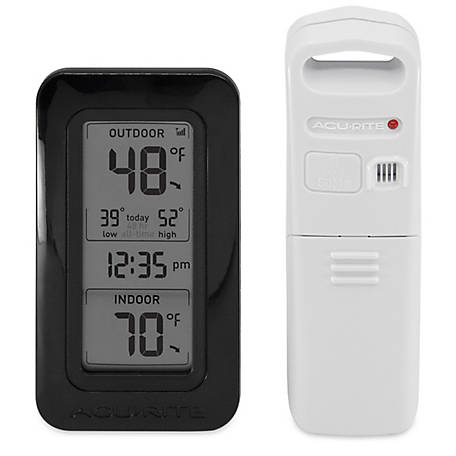
The AcuRite Digital Thermometer with Indoor/Outdoor Temperature delivers precise, reliable multi-zone temperature information. This digital thermometer has an easy-to-read LCD screen that shows the current temperature for multiple locations. One temperature reading is taken by a built-in sensor inside the digital weather thermometer display. Additional reading is taken by a wireless thermometer sensor you can place either outdoors or in another room. Features of this AcuRite thermometer include daily high and low records and a 12-hour clock. The sleek, stylish display stands upright for tabletop use and is wall-mountable. for a multi-zone wireless weather thermometer solution, you can connect up to two additional wireless sensors (sold separately), to monitor a total of four locations (including the display's built-in thermometer). When used with multiple wireless sensors, if desired, the display can be set to auto-cycle through each sensor's readings. The digital weather thermometer sensor features powerful wireless technology, a weather-resistant design, and an integrated hanger for easy mounting.One-Year Limited Warranty
For additional information on this product, please see the Product Documents section for all downloadable user manuals, installation guides, brochures and warranty statements.
- Digital thermometer display makes it easy to see temperature readings at a glance
- Indoor and outdoor temperature (Fahrenheit and Celsius) with large, bold digits
- Daily high and low temperature records for the display's built-in thermometer and wireless sensor
- Equipped with a 12-hour digital clock
- Totally wireless tabletop or wall-mountable design gives you the flexibility to place this thermometer anywhere
- Indicator for wireless sensor signal strength
- Wireless Temperature Sensor accurately measures temperature
- Strong wireless range up to 330 ft. (100 meters)
- Weather sensor transmits data every 16 seconds
- Durable, all-weather construction makes the thermometer perfect for indoor or outdoor use
- Easy installation includes integrated hanger
- Includes: Digital Thermometer Display, Temperature Sensor, instruction manual
| Brand | AcuRite |
|---|---|
| Country of Origin | Imported |
| Battery Size | AA |
| Display Size | 6.4 in. H x 2.5 in. W x 1.97 in. D |
| Display Type | Digital |
| Features | Weather-Resistant |
| Maximum Temperature | 158 deg. F |
| Measurements Supported | Temperature |
| Minimum Temperature | -40 deg. F |
| Mounting Type | Wall Mount |
| Primary Color | Black |
| Primary Material | Plastic |
| Product Height | 6-3/8 in. |
| Product Length | 2-1/2 in. |
| Product Weight | 1 lb. |
| Product Width | 1-3/4 in. |
| Units Of Measure | Fahrenheit and Celsius |
| Thermometer Type | Digital |
| Warranty | 1 Year Limited |
| Manufacturer Part Number | 02059M |
Q: How to set time on acu-rite weather station
2 years ago- A: Thank you for your question. The following steps will assist you in setting your thermometer: Set the Time & Units Press and hold the “SET” button, located on the back of the display, to enter SET MODE. Once in set mode, the preference you are currently setting will blink on the display. To adjust the currently selected (flashing) item, press and release the “▲” or “▼“ buttons (press and HOLD to fast adjust). To save your adjustments, press and release the “SET” button again to adjust the next preference. The preference set order is as follows: CLOCK HOUR CLOCK MINUTE TEMPERATURE UNITS (ºF or ºC)* *You may also select between degrees Fahrenheit (°F) or Celsius (°C) temperature units after setup by pressing and releasing the °F/°C button, located inside the battery compartment. You will automatically exit SET MODE if no buttons are pressed for 8 seconds. Enter setup mode at any time by pressing and holding the “SET” button. If you have any other questions, please reach out to the AcuRite Support Team via email or live chat. We are happy to assist you. -Rachell2 years agoHelpful?
Q: can these be used to monitor freezers
3 years ago- A: Yes, the included sensor can measure temperatures as low as -40 degrees and can be used in a freezer. If you have further questions, please reach out to our support team via live chat or email request on the AcuRite Support website. Have a spectacular day! Haylee AcuRite Support Team2 years agoHelpful?
Q: What kind of AA battery do I need for my Acurite digital thermometer model # 00592TX? Is Akaline ok?
3 years ago- A: AcuRite recommends high quality alkaline or lithium batteries for the best product performance. Heavy duty or rechargeable batteries are not recommended.3 years agoHelpful?
Q: What is the lowest temperature this unit will record/display?
5 years ago- A: I have seen it read as low as minus 3 degrees here in Michigan5 years agoHelpful?
Q: Where can I buy the extra sensors described in the product write-up? Does Tractor Supply carry them?
7 years ago- A: You can purchase the additional compatible sensors on AcuRite.com. The compatible sensors model number is 06002. If you have any other questions, please contact the AcuRite Support Team via Live Chat, we are happy to assist you. Thank you.7 years agoHelpful?
Q&As
Q: How to set time on acu-rite weather station
2 years ago- A: Thank you for your question. The following steps will assist you in setting your thermometer: Set the Time & Units Press and hold the “SET” button, located on the back of the display, to enter SET MODE. Once in set mode, the preference you are currently setting will blink on the display. To adjust the currently selected (flashing) item, press and release the “▲” or “▼“ buttons (press and HOLD to fast adjust). To save your adjustments, press and release the “SET” button again to adjust the next preference. The preference set order is as follows: CLOCK HOUR CLOCK MINUTE TEMPERATURE UNITS (ºF or ºC)* *You may also select between degrees Fahrenheit (°F) or Celsius (°C) temperature units after setup by pressing and releasing the °F/°C button, located inside the battery compartment. You will automatically exit SET MODE if no buttons are pressed for 8 seconds. Enter setup mode at any time by pressing and holding the “SET” button. If you have any other questions, please reach out to the AcuRite Support Team via email or live chat. We are happy to assist you. -Rachell2 years agoHelpful?
Q: can these be used to monitor freezers
3 years ago- A: Yes, the included sensor can measure temperatures as low as -40 degrees and can be used in a freezer. If you have further questions, please reach out to our support team via live chat or email request on the AcuRite Support website. Have a spectacular day! Haylee AcuRite Support Team2 years agoHelpful?
Q: What kind of AA battery do I need for my Acurite digital thermometer model # 00592TX? Is Akaline ok?
3 years ago- A: AcuRite recommends high quality alkaline or lithium batteries for the best product performance. Heavy duty or rechargeable batteries are not recommended.3 years agoHelpful?
Q: What is the lowest temperature this unit will record/display?
5 years ago- A: I have seen it read as low as minus 3 degrees here in Michigan5 years agoHelpful?
Q: Where can I buy the extra sensors described in the product write-up? Does Tractor Supply carry them?
7 years ago- A: You can purchase the additional compatible sensors on AcuRite.com. The compatible sensors model number is 06002. If you have any other questions, please contact the AcuRite Support Team via Live Chat, we are happy to assist you. Thank you.7 years agoHelpful?
Similar Items
-
-
-
Top Rated
-
-
-
Top Rated
-
-
Top Rated






Reviews
- English
- German
- French
- Spanish
- Portuguese
- Italian
- Korean
- Chinese
- Japanese
- Arabic
- temperature
- purchase
- satisfaction
- setup
- price
- accuracy
- battery
- sensor
Quality and longevity
Yes, I recommend this product.

Originally posted on AcuRite
Not pleased with long-term use
No, I do not recommend this product.
Originally posted on AcuRite
Nice, if it worked
Hard Reset:
1. Bring both the sensor and display unit together and remove batteries from the outdoor sensor. Make sure that the Wireless Reception Indicator on the display drops to zero bars to ensure that your display was connected to the correct sensor. (If your wireless reception indicator already indicates zero bars, please proceed to Step #2.)
NOTE: If your display unit continues to show a strong connection, there is another sensor in your area that your display is connecting to (either a neighbor's or from another of your AcuRite units). If you have multiple sensors, make sure to use a different ABC channel on each.
2. Remove the batteries and/or power adapter from the display unit.
3. Change the A-B-C switch on the outdoor sensor to a new channel then press and hold the reset button in the battery compartment of the display for 20 seconds, if applicable.
4. Reinstall the batteries in the outdoor sensor.
5. Once the batteries are inserted you should see the red LED light blink approx. every 16 seconds on the front of the sensor. The red LED light should NOT stay on continuously.
6. Reinstall batteries and/or power cord into the display unit then immediately press and hold the reset button again for 20 seconds, if applicable.
7. Use the UP arrow button to adjust the ABC indicator on the display to match your outdoor sensor's new channel.
8. Let the units sit within a couple of feet of each other for approximately 5 minutes or until you see a solid sensor signal.
For further assistance, please reach out to our support team via live chat or email request on the AcuRite Support website.
Have a marvelous day!
Haylee
AcuRite Support Team

Wouldn't buy it again.
No, I do not recommend this product.
Originally posted on AcuRite