
Mighty Mule Wireless Digital Keypad for Automatic Gate Openers
Sale
Save(25%)


Mighty Mule Wireless Digital Keypad for Automatic Gate Openers
Limited Time Deal
Item # 1429804


Sale
Save(25%)
Size: One Size
Color:
Spend $49.99 to unlock free delivery!
Get everything you need



Neighbor’s Club Members earn points with purchases.
Limited Time Deal
Item # 1429804
Sale
Save(25%)

Size: One Size
Color:
Spend $49.99 to unlock free delivery!
Shopping at
Grassland (franklin) TN
Delivery to
Pickup Nearby at FRANKLIN TN(6.7) miles Free
Ship to store at Grassland (franklin) TN
Free standard delivery on online footwear & Clothing purchases of $49 and over.
Get everything you need
Neighbor’s Club Members earn points with purchases.
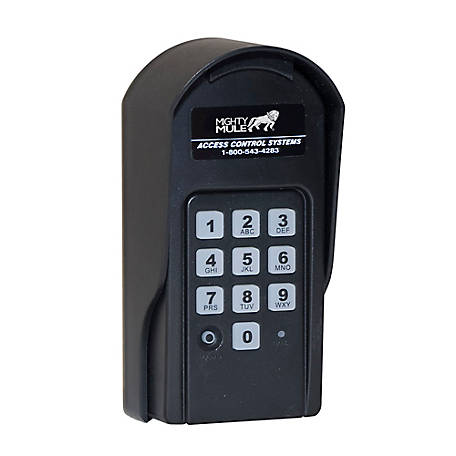
The Mighty Mule MMK200 Gate Opener Digital Keypad is designed for use with Mighty Mule Automatic Gate openers. This wireless digital keypad provides controlled access to your property. It can be programmed to use up to twenty-five different personal identification numbers. Our convenient wireless keypad features an extensive wireless 100 ft. range.
For additional information on this product, please see the Product Documents section for all downloadable user manuals, installation guides, brochures and warranty statements.
- Compatible with Mighty Mule Gate Opener model numbers: MM271, MM272, MM371W, MM372W, MM571W, TS571W and MM572W
- Mighty Mule digital keypad supports up to 25 user codes: ideal for guests, short term renters, service providers and caretakers
- Built in lighting: soft blue back lighting for use at night or in dark areas
- Wireless digital keypad is easy to program: add and remove codes for users in a few steps
- Features an extensive 100 ft. wireless range
- Includes: three AAA batteries
- Backed by a 1 year Mighty Mule Warranty and Technical Support
| Brand | Mighty Mule |
|---|---|
| Country of Origin | Imported |
| Battery Size | AAA |
| Compatibility | MM271,MM371W, MM372W, MM571W, TS571W and MM572W. |
| Gate Opener Accessory Type | Keypads |
| Number of Batteries Required | 3 |
| Package Quantity | 1 |
| Primary Color | Black |
| Primary Material | ABS |
| Product Height | 9.8 in. |
| Product Length | 2.2 in. |
| Product Weight | 8.75 lb. |
| Product Width | 4.1 in. |
| Warranty | 1 Year |
| Color | Black |
| Size | One Size |
| Manufacturer Part Number | MMK200 |
Q: how can the keypad weigh 8.75 pounds?
a month ago- A: Hi, to best assist you with this inquiry, please reach out to Tractor Supply Customer Solutions at 877-718-6750.a month agoHelpful?
Q: Does the key pad come with code preprogrammed for use?
Anonymous3 months ago- A: Kathy, yes, you can program 25 different codes.3 months agoHelpful?

Q: How do you get it to close the gate after using the keypad, mine does not close after a person comes in.
10 months ago- A: The auto-close feature on a Mighty Mule gate opener is controlled by settings on the main control box circuit board, not the keypad. To activate this function, locate the control box, access the circuit board's auto-close timer setting (which is typically off by default), and adjust it to a desired delay between 3 and 120 seconds.10 months agoHelpful?
Q: How does guest or caregiver or delivery exit when entering using keypad, do you need 2 keypads
10 months ago- A: There is no exit keypad for the Mighty Mule Wireless Digital Keypad, and you do not need two keypads:10 months agoHelpful?
Q: After programming, Once the access code is entered, does the contact make or break on the keypad?
a year ago- A: Hello, thank you for your question. Upon correct code entry, the MMK200 keypad closes (makes) its normally‑open dry contact briefly, which the gate opener registers to start operation.a year agoHelpful?
Q: Battery life: why is the keypad I already have going through batteries in less than a month??
a year ago- A: Alex, Please call our Tech Line, we have a great Tech Team that is available to help you. They can be reached at 1-800-543-1236 M-F 8am-7pm and Sat 10am-6pm EST.a year agoHelpful?
Q: Is this compatible with the rsck371w? Can it be wired in to avoid battery use?
2 years ago- A: T - Yes, the Mighty Mule MMK200 Gate Opener Digital Keypad is compatible with your Gate Opener. Interesting question on wiring it, did a doublecheck on that and it cannot be wired in. The three AAA Batteries should last about a year.2 years agoHelpful?
Q: How do you change the aaa batteries in keypad
3 years ago- A: Mike - 1) Remove one screw then remove the Battery Cradle. 2) Remove the old Batteries. 3) Install 3 fresh AAA Batteries in the Cradle. 4) Replace Battery Cradle and secure the screw.3 years agoHelpful?
Q: Does the mmk200 work with a mighty mule 502 dual gate opener?
3 years ago- A: Tom H. - Unfortunately, I do not see the MM502 listed as compatible. The 502 has similar specs to our 572W but I cannot say for sure that the MMK200 will work for you.3 years agoHelpful?
Q: can you attach this key pad to any type of post?
3 years ago- A: Dear Wiel617, great question. You have several options, wood post, metal post, The Mighty Mule post FM100 sold at Tractor supply.com. And plastic post will work. Thank you3 years agoHelpful?
Q&As
Q: how can the keypad weigh 8.75 pounds?
a month ago- A: Hi, to best assist you with this inquiry, please reach out to Tractor Supply Customer Solutions at 877-718-6750.a month agoHelpful?
Q: Does the key pad come with code preprogrammed for use?
Anonymous3 months ago- A: Kathy, yes, you can program 25 different codes.3 months agoHelpful?
Q: How do you get it to close the gate after using the keypad, mine does not close after a person comes in.
10 months ago- A: The auto-close feature on a Mighty Mule gate opener is controlled by settings on the main control box circuit board, not the keypad. To activate this function, locate the control box, access the circuit board's auto-close timer setting (which is typically off by default), and adjust it to a desired delay between 3 and 120 seconds.10 months agoHelpful?
Q: How does guest or caregiver or delivery exit when entering using keypad, do you need 2 keypads
10 months ago- A: There is no exit keypad for the Mighty Mule Wireless Digital Keypad, and you do not need two keypads:10 months agoHelpful?
Q: After programming, Once the access code is entered, does the contact make or break on the keypad?
a year ago- A: Hello, thank you for your question. Upon correct code entry, the MMK200 keypad closes (makes) its normally‑open dry contact briefly, which the gate opener registers to start operation.a year agoHelpful?
Q: Battery life: why is the keypad I already have going through batteries in less than a month??
a year ago- A: Alex, Please call our Tech Line, we have a great Tech Team that is available to help you. They can be reached at 1-800-543-1236 M-F 8am-7pm and Sat 10am-6pm EST.a year agoHelpful?
Q: Is this compatible with the rsck371w? Can it be wired in to avoid battery use?
2 years ago- A: T - Yes, the Mighty Mule MMK200 Gate Opener Digital Keypad is compatible with your Gate Opener. Interesting question on wiring it, did a doublecheck on that and it cannot be wired in. The three AAA Batteries should last about a year.2 years agoHelpful?
Q: How do you change the aaa batteries in keypad
3 years ago- A: Mike - 1) Remove one screw then remove the Battery Cradle. 2) Remove the old Batteries. 3) Install 3 fresh AAA Batteries in the Cradle. 4) Replace Battery Cradle and secure the screw.3 years agoHelpful?
Q: Does the mmk200 work with a mighty mule 502 dual gate opener?
3 years ago- A: Tom H. - Unfortunately, I do not see the MM502 listed as compatible. The 502 has similar specs to our 572W but I cannot say for sure that the MMK200 will work for you.3 years agoHelpful?
Q: can you attach this key pad to any type of post?
3 years ago- A: Dear Wiel617, great question. You have several options, wood post, metal post, The Mighty Mule post FM100 sold at Tractor supply.com. And plastic post will work. Thank you3 years agoHelpful?
Similar Items
-
-
-
-
-
-
-
-
-
-
-
-
Top Rated




Frequently Bought Together





Reviews
Summary of Reviews
- English
- German
- French
- Spanish
- Portuguese
- Italian
- Korean
- Chinese
- Japanese
- Arabic
Customer Images and Videos
- mounting
- installation
- ease of use
- purchase
- setup
- battery
- design
- cordless
Great keypad
Yes, I recommend this product.
Manvel
Yes, I recommend this product.
Works great
Yes, I recommend this product.

Originally posted on mightymule.com
Mighty mule keypad
Yes, I recommend this product.