


JobSmart 3,000-Lumen Rechargeable LED Spotlight
Exclusive
JobSmart 3,000-Lumen Rechargeable LED Spotlight
Item # 2516803


$19.99
Add a protection plan
Powersport plans are not available in CA.

Neighbor’s Club Members earn points with purchases.
$19.99
Out of stock at or near
Grassland (franklin) TN
Out of stock delivering to
37027
This item is not available
Search Stores
Temporarily unavailable
Add a protection plan
Powersport plans are not available in CA.
Neighbor’s Club Members earn points with purchases.
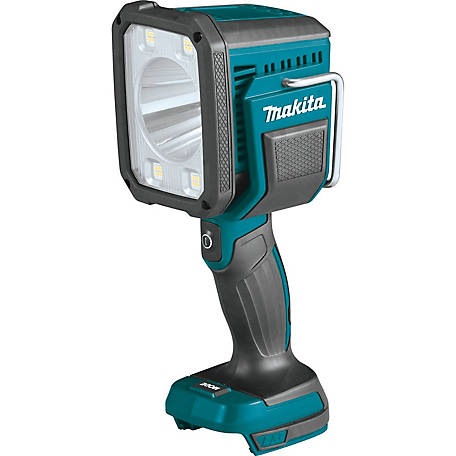
Grab the JobSmart 3,000-Lumen Rechargeable LED Spotlight anytime you need bright, reliable light at work. The SMD and LED bulbs produce up to 3,000 lumens with a beam of up to 492 ft. for clear viewing from a distance. And thanks to the durable ABS, PC and aluminum materials, this spotlight can handle the rigors of the jobsite. It's powered by 2 lithium batteries and offers a built-in power bank function for charging other devices as needed.
- Uses reliable SMD and 30W LED bulbs
- Produces a maximum of 3,000 lumens for clear viewing
- Long 492 ft. (150 m) beam distance that allows you to see farther
- Run time ranges from 2 to 5 hours depending on the mode used
- Available modes: LED, COB, LED + COB and OFF
- Made from durable ABS, PC and aluminum materials to withstand wear and tear
- IP44 waterproof rated for safe use in inclement weather
- Powered by 2 rechargeable 3.7V 2,000 mAh lithium batteries
- Built-in power bank function allows you to charge other devices while on the go
- Takes about 5 to 6 hours to fully charge
- Power indicator light keeps you informed on the battery's status
- Handheld spotlight includes a USB-C cable for charging and a convenient tail rope
- Spotlight dimensions: 8.07 in. x 4.53 in. x 8.86 in.
| Brand | JobSmart |
|---|---|
| Country of Origin | Imported |
| Battery Size | 3.7V |
| Beam Color | White |
| Beam Distance | 492 ft. 150m |
| Beam Type | Spot |
| Bulb Type | LED |
| Features | 3000-Lumen Brightness - Powerful LED lighting with a 492ft (150m) range, featuring LED/flood/dual lighting modes. Multi-Functional Design - Built-in USB power bank function, includes a USB-C cable & tail rope, with an adjustable stand for hands-free use |
| Impact Resistance | IK 6 |
| Maximum Lumen Rating | 3,000LM |
| Minimum Lumen Rating | 600LM |
| Number of Batteries Required | 2 |
| Number of Modes | 3 |
| Primary Color | Gray |
| Primary Material | ABS |
| Product Height | 7.95in. |
| Product Length | 4.06in. |
| Product Weight | 2.29LBS |
| Product Width | 7.83 in. |
| Run Time | 2-5HS |
| Warranty | 1YEAR |
| Manufacturer Part Number | BMSLA01 |
Have a question?
Start typing your question and we'll check if it was already asked and answered.
1 - 10 of 10 Questions
Newest questions
Q: I came across my old light when unpacking storage. It has a 120v charging port as well as USB port. Is it safe to charge this type battery after many years of storage? I have it plugged in outside and a solid red light is glowing. Thanks.
2 months ago1 Answer
- A: Since the spotlight is safely outside, leave it there for its initial 5-to-6-hour charge cycle. Walk out to check on it every 30 to 45 minutes and look for these warning signs: Excessive Heat: The handle or battery compartment area should not feel hot to the touch. Mild warmth is normal; hot is dangerous .Deformation: Ensure the plastic casing is not warping, bulging, or swelling. Odors or Sounds: Unplug it immediately if you notice a sweet, metallic chemical smell, or hear any subtle hissing or popping sounds Next Steps for Testing Let it cycle: Keep it outside until the light changes from red to green. Do not leave it overnight: Unplug the spotlight if you go to sleep or leave the house. Test the runtime: Once charged, turn it on. If the battery was permanently damaged by storage, the light may die within a few minutes instead of lasting its normal 2-to-5-hour runtime. If it holds a charge and runs normally without overheating, your battery survived storage2 months agoHelpful?
Q: The charge port on the spotlight is on the back you take the gray backing off it twists which made it really pain in the butt to find
a year ago1 Answer
- A: yes, that is correct. Locate the protective rubber cover on the back of the device and open it.a year agoHelpful?
Q: Where is the charge port located?
a year ago1 Answer
- A: The charge port for the JobSmart 3,000-Lumen Rechargeable LED Spotlight is located at the back of the device, under a protective rubber cover. The cover is present for the spotlight's IP44 waterproof rating To charge your spotlight Locate the protective rubber cover on the back of the device and open it. Insert the included USB-C charging cable into the port. Connect the other end of the cable to a power source with a 5V 1A adapter. A red LED indicator light will turn on to show the spotlight is charging. This light will change to green when charging is completea year agoHelpful?
Q: How do I charge this spotlight
a year ago1 Answer
- A: The charge port for the JobSmart 3,000-Lumen Rechargeable LED Spotlight is located at the back of the device, under a protective rubber cover. The cover is present for the spotlight's IP44 waterproof rating To charge your spotlight Locate the protective rubber cover on the back of the device and open it. Insert the included USB-C charging cable into the port. Connect the other end of the cable to a power source with a 5V 1A adapter. A red LED indicator light will turn on to show the spotlight is charging. This light will change to green when charging is completea year agoHelpful?
Q: Were is the charge port on this thing
a year ago1 Answer
- A: The charge port for the JobSmart 3,000-Lumen Rechargeable LED Spotlight is located at the back of the device, under a protective rubber cover. The cover is present for the spotlight's IP44 waterproof rating To charge your spotlight Locate the protective rubber cover on the back of the device and open it. Insert the included USB-C charging cable into the port. Connect the other end of the cable to a power source with a 5V 1A adapter. A red LED indicator light will turn on to show the spotlight is charging. This light will change to green when charging is completea year agoHelpful?
Q: How do I know when it is fully charged
a year ago1 Answer
- A: Power indicator light keeps you informed on the battery's status.Takes about 5 to 6 hours to fully chargea year agoHelpful?
Q: How do I know when it is fully charged
a year ago1 Answer
- A: Power indicator light keeps you informed on the battery's status.Takes about 5 to 6 hours to fully chargea year agoHelpful?
Q: how do i get to the charging port? where is the charging cover?
a year ago1 Answer
- A: For the JobSmart 3,000-Lumen Rechargeable LED Spotlight, the charging port is located within the head of the device. To find it, you must twist or rotate the head to reveal the hidden port.a year agoHelpful?
Q: Does this light include batteries?
a year ago1 Answer
- A: Yes, it does. The battery model is : 2x3.7V 2500mAh Li-battery.a year agoHelpful?
Q: How do you remove the back of the light to charge it? Also it indicates charger included and it is just the cable.
a year ago1 Answer
- A: Please check your e ail for the requested information. Move the charging cover to the left and you will see the charging port. Additionally, this product doesn't have a charger and only has type-C cable.a year agoHelpful?
Q&As
Have a question?
Start typing your question and we'll check if it was already asked and answered.
1 - 10 of 10 Questions
Newest questions
Q: I came across my old light when unpacking storage. It has a 120v charging port as well as USB port. Is it safe to charge this type battery after many years of storage? I have it plugged in outside and a solid red light is glowing. Thanks.
2 months ago1 Answer
- A: Since the spotlight is safely outside, leave it there for its initial 5-to-6-hour charge cycle. Walk out to check on it every 30 to 45 minutes and look for these warning signs: Excessive Heat: The handle or battery compartment area should not feel hot to the touch. Mild warmth is normal; hot is dangerous .Deformation: Ensure the plastic casing is not warping, bulging, or swelling. Odors or Sounds: Unplug it immediately if you notice a sweet, metallic chemical smell, or hear any subtle hissing or popping sounds Next Steps for Testing Let it cycle: Keep it outside until the light changes from red to green. Do not leave it overnight: Unplug the spotlight if you go to sleep or leave the house. Test the runtime: Once charged, turn it on. If the battery was permanently damaged by storage, the light may die within a few minutes instead of lasting its normal 2-to-5-hour runtime. If it holds a charge and runs normally without overheating, your battery survived storage2 months agoHelpful?
Q: The charge port on the spotlight is on the back you take the gray backing off it twists which made it really pain in the butt to find
a year ago1 Answer
- A: yes, that is correct. Locate the protective rubber cover on the back of the device and open it.a year agoHelpful?
Q: Where is the charge port located?
a year ago1 Answer
- A: The charge port for the JobSmart 3,000-Lumen Rechargeable LED Spotlight is located at the back of the device, under a protective rubber cover. The cover is present for the spotlight's IP44 waterproof rating To charge your spotlight Locate the protective rubber cover on the back of the device and open it. Insert the included USB-C charging cable into the port. Connect the other end of the cable to a power source with a 5V 1A adapter. A red LED indicator light will turn on to show the spotlight is charging. This light will change to green when charging is completea year agoHelpful?
Q: How do I charge this spotlight
a year ago1 Answer
- A: The charge port for the JobSmart 3,000-Lumen Rechargeable LED Spotlight is located at the back of the device, under a protective rubber cover. The cover is present for the spotlight's IP44 waterproof rating To charge your spotlight Locate the protective rubber cover on the back of the device and open it. Insert the included USB-C charging cable into the port. Connect the other end of the cable to a power source with a 5V 1A adapter. A red LED indicator light will turn on to show the spotlight is charging. This light will change to green when charging is completea year agoHelpful?
Q: Were is the charge port on this thing
a year ago1 Answer
- A: The charge port for the JobSmart 3,000-Lumen Rechargeable LED Spotlight is located at the back of the device, under a protective rubber cover. The cover is present for the spotlight's IP44 waterproof rating To charge your spotlight Locate the protective rubber cover on the back of the device and open it. Insert the included USB-C charging cable into the port. Connect the other end of the cable to a power source with a 5V 1A adapter. A red LED indicator light will turn on to show the spotlight is charging. This light will change to green when charging is completea year agoHelpful?
Q: How do I know when it is fully charged
a year ago1 Answer
- A: Power indicator light keeps you informed on the battery's status.Takes about 5 to 6 hours to fully chargea year agoHelpful?
Q: How do I know when it is fully charged
a year ago1 Answer
- A: Power indicator light keeps you informed on the battery's status.Takes about 5 to 6 hours to fully chargea year agoHelpful?
Q: how do i get to the charging port? where is the charging cover?
a year ago1 Answer
- A: For the JobSmart 3,000-Lumen Rechargeable LED Spotlight, the charging port is located within the head of the device. To find it, you must twist or rotate the head to reveal the hidden port.a year agoHelpful?
Q: Does this light include batteries?
a year ago1 Answer
- A: Yes, it does. The battery model is : 2x3.7V 2500mAh Li-battery.a year agoHelpful?
Q: How do you remove the back of the light to charge it? Also it indicates charger included and it is just the cable.
a year ago1 Answer
- A: Please check your e ail for the requested information. Move the charging cover to the left and you will see the charging port. Additionally, this product doesn't have a charger and only has type-C cable.a year agoHelpful?
Similar Items
-
Top Rated
-
-
Top Rated
-
-
Top Rated
-
Top Rated
-
Top Rated
-
Top Rated
-
-
-
Top Rated
-


Frequently Bought Together




Reviews
1 to 4 of 5 Reviews .
1 – 4 of 5 Reviews
Most Recent
Maryland
Review 1
5 out of 5 stars.
Nice and light spotlight.
5 months ago
I like this LED Spotlight very much. I use it to see what is going on in the wood behind my my house at night. The brightness and the range are excellent. Also, since it is rechargeable, it is inexpensive to operate. I have not use it in wet environment so I don't know how good it waterproofing ability is.
Yes, I recommend this product.
Review 1
5 out of 5 stars.
Great value
11 months ago
I bought this as a backup for the very expensive "marine" spotlights that I have on my boat. Although the documentation is lacking and folks have a hard time finding the arrows on the back indicating how to remove the cover for charging, it is bright, inexpensive, seems rugged and is waterproof enough for occasional use on a boat.
Yes, I recommend this product.
Nc
Review 1
5 out of 5 stars.
Amazingly rugged and BRIGHT!!!
a year ago
This is an amazing spotlight! I’ve had ones that were 100’s of dollars not work as well as this one! The charging ports support USB–C charging and our water tight on the rear of the spotlight under a twist backing. It’s the most heavy duty spotlight I’ve ever used! I cannot express how impressed I am with this spotlight!!! It’s everything stated and more. It’s so heavy duty and the brightness is unbelievable. Way better than Lux Pro and others I’ve purchased.
Yes, I recommend this product.
Review 1
1 out of 5 stars.
Unable to use
a year ago
So far I can not find a charging port on this spotlight don't know if I have to take the darn thing apart a cord came with it but there is no place to plug it in. Going to take it back to the store