HalloweenPetLawn & GardenTruck & AutomotiveSporting GoodsHorseFarm & RanchClothingLivestockPet & Animal PharmacyToolsPoultryFencing & GatesHome ImprovementOutdoor LivingHeating & CoolingHome Decor & FurnitureOutdoor Power EquipmentTrailers & TowingBoots & ShoesWild Birds & WildlifeToysGift CardsServices Propane RefillTrailer RentalGarden CenterFeed CenterSame Day DeliveryPetVet ClinicPet WashGrooming at PetsenseDog Training at PetsenseTractor Supply RxPet InsuranceWag!

"Savings and Offers"

Weekly AdSaleClearance

"More Options"

Weekly AdWhat's NewTractor Supply AppEarn Rewards with Neighbor's ClubHometown HeroesLife Out Here BlogTSC Exclusive BrandsTop BrandsClearance ItemsBattery FinderOutdoor Power Equipment Parts FinderHitch Finder

Spend $49.99 to unlock Free Delivery on most orders

|
Learn More
Order statusTSC Credit CardsWhat’s newPetsenseWeekly Ad
​
Sign In / EnrollGet rewarded!
​
Halloween
Pet
Lawn & Garden
Truck & Automotive
Sporting Goods
Horse
Farm & Ranch
Clothing
Livestock
Pet & Animal Pharmacy
Tools
Poultry
Fencing & Gates
Home Improvement
Outdoor Living
Heating & Cooling

Menu

Search

Home

Sign In

Cart
3.9
(69)
3.9 out of 5 stars. 69 reviews
product-image
Shop all AcuRite

AcuRite Weather Station with Jumbo Display

3.9

(69 Reviews)

|

Item # 104423299

$49.99
A woman outside with a dog
  1. Home
  2. /
  3. Outdoor Living
  4. /
  5. Patio Furniture & Decor
  6. /
  7. Outdoor Decor
  8. /
  9. Thermometers & Weather Stations
  10. /
  11. Weather Stations
  12. /
  13. AcuRite Weather Station with Jumbo Display

  1. Home
  2. /
  3. /
  4. Weather Stations

AcuRite Weather Station with Jumbo Display

Shop all AcuRite
AcuRite Weather Station with Jumbo Display

Item # 104423299

Stocked & Ready
AcuRite AcuRite Weather Station with Jumbo Display
$49.99


Add a protection plan
Powersport plans are not available in CA & MD.
Get everything you need
AcuRite Weather Station with Jumbo Display
3.9(69)

AcuRite Weather Station with Jumbo Display

$49

.99

Corona Tools 30 in. #10 Aluminum D-Grip Western Scoop Shovel, Hardwood Handle
4.5(2)

Corona Tools 30 in. #10 Aluminum D-Grip Western Scoop Shovel, Hardwood Handle

$69

.99

AcuRite Color Weather Forecaster with Temperature and Humidity
4.5(32)

AcuRite Color Weather Forecaster with Temperature and Humidity

$44

.99

AcuRite 13.5 in. Indoor/Outdoor White Analog Thermometer/Hygrometer
4.2(76)

AcuRite 13.5 in. Indoor/Outdoor White Analog Thermometer/Hygrometer

$10

.99

Neighbor's Club logo
Neighbor’s Club Members earn points with purchases.

Sign in or Join Now

Shop all AcuRite
AcuRite Weather Station with Jumbo Display

Item # 104423299

Stocked & Ready
AcuRite AcuRite Weather Station with Jumbo Display

$49.99
financeCard Logo
New Cardmembers earn a $20 Reward‡ with qualifying purchase of $20 or more plus earn 5% in Rewards+ on this purchase. Valid through 9/20/26.

Shopping at

Grassland (franklin) TN

Delivery to

Pickup Nearby at OLD HICKORY TN(24.1) miles Free

Ship to store at Grassland (franklin) TN

Free standard delivery on online footwear & Clothing purchases of $49 and over.

​

Add a protection plan
Powersport plans are not available in CA & MD.
Get everything you need
AcuRite Weather Station with Jumbo Display
3.9(69)

AcuRite Weather Station with Jumbo Display

$49

.99

Corona Tools 30 in. #10 Aluminum D-Grip Western Scoop Shovel, Hardwood Handle
4.5(2)

Corona Tools 30 in. #10 Aluminum D-Grip Western Scoop Shovel, Hardwood Handle

$69

.99

AcuRite Color Weather Forecaster with Temperature and Humidity
4.5(32)

AcuRite Color Weather Forecaster with Temperature and Humidity

$44

.99

AcuRite 13.5 in. Indoor/Outdoor White Analog Thermometer/Hygrometer
4.2(76)

AcuRite 13.5 in. Indoor/Outdoor White Analog Thermometer/Hygrometer

$10

.99

Neighbor's Club logo
Neighbor’s Club Members earn points with purchases.

Sign in or Join Now

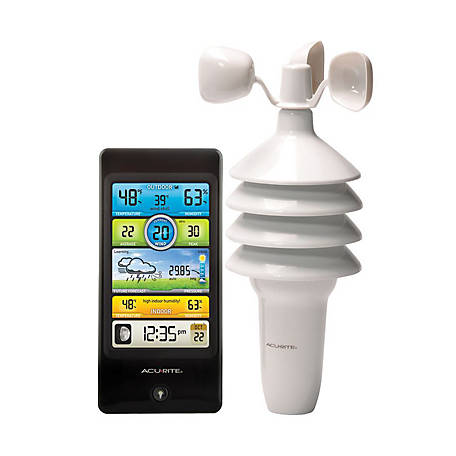
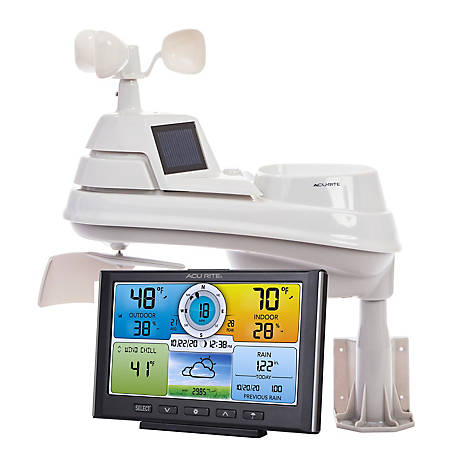
Looking for a reliable home weather station? Get the AcuRite Weather Station with Jumbo Display. This indoor/outdoor weather monitor offers a wide range of weather data, including temperature with high/low readings and a calendar. Plus, this digital thermometer has a jumbo LCD for easy viewing.One-Year Limited Warranty

For additional information on this product, please see the Product Documents section for all downloadable user manuals, installation guides, brochures and warranty statements.

  • Bold, easy-to-read LCD display includes indoor/outdoor temperature with daily high/low readings
  • Home weather station uses patented Self-Calibrating Technology to provide your personal forecast of 12 to 24 hour weather conditions
  • Digital thermometer also shows calendar and atomic clock for added convenience
BrandAcuRite
Country of OriginImported
Display TypeLCD
FeaturesIndoor/Outdoor Temperature, weather forecast, clock, date, day
Maximum Temperature158 deg.
Maximum Transmission Range330 ft.
Measurements SupportedTemperature
Minimum Temperature-40 deg.
Mounting TypeWall Mount
Power TypeBattery
Primary ColorGray
Primary MaterialPlastic
Product Height6.2 in.
Product Length7.75 in.
Product Weight1.22 lb.
Product Width1 in.
Receiver Battery SizeAA
Receiver Depth1 in.
Receiver Height6.2 in.
Receiver Width7.9 in.
Sensor Battery SizeAA
Sensor Depth1 in.
Sensor Height5.125 in.
Sensor Width1.625 in.
Temperature Measurements UnitsFahrenheit and Celsius
Warranty1 Year Limited
Manufacturer Part Number75077A4DI

Have a question?
Start typing your question and we'll check if it was already asked and answered.
1 - 10 of 13 Questions
Sort by
Newest questions

Q: Do you have this available for pickup in Belfast ?

8 months ago
1 Answer
  • A: Hello, thank you for your question. The website is not currently showing any availability at that specific store. A local store team member can do a region search for a specific product. To find the store nearest you, use our Store Locator, which is available on the TractorSupply.com home page in the top right corner or by referring to the link below. https://www.tractorsupply.com/tsc/store-locator? For more assistance, please contact the Customer Solutions Center via "Contact Us" form or call us at 1-877-718-6750. https://www.tractorsupply.com/tsc/customer-solutions?cm_sp=LP-_-Customer+Solutions-_-Contact+Customer+Solutions#contactus_main
    8 months ago
    Helpful?

Q: Mifflin county,Pa. Is.this area covered in forecast?

a year ago
1 Answer
  • A: This weather station features AcuRite’s patented Self-Calibrating Forecasting to provide your personal forecast of weather conditions for the next 12 to 24 hours by collecting data from the display and the sensor in your backyard. It generates a forecast with pinpoint accuracy - personalized for your exact location. If you have further questions, please reach out to our support team via live chat or email request on the AcuRite Support website. Have a terrific day! Haylee AcuRite Support Team
    a year ago
    Helpful?

Q: Does this have the capability to show the 7 day forecast?

a year ago
2 Answers
  • A: No, this station only features a 12-24 hour future forecast. If you have further questions, please reach out tour support team via live chat or email request on the AcuRite Support website. Have a pleasant day! Haylee AcuRite Support Team
    a year ago
    Helpful?

Q: How do I put it to est

2 years ago
1 Answer
  • A: To set the time zone setting to EST, please follow the steps below. Enter SET mode at any time by pressing the “SET” button, located on the back of the display unit. Once in set mode, the preference you are currently setting will blink on the display. To adjust the currently selected (flashing) item, press and release the “+” or “–“ buttons (press and HOLD to fast adjust). To save your adjustments, press and release the “SET” button again to adjust the next preference. The preference set order is as follows: TIME ZONE ( PST MST CST EST AST HAST AKST) DST (Daylight Saving Time ON or OFF)* CLOCK HOUR CLOCK MINUTE CALENDAR MONTH CALENDAR DATE CALENDAR YEAR You will automatically exit SET MODE if no buttons are pressed for 30 seconds. Enter setup mode at any time by pressing the “SET” button. *If you live in an area that observes Daylight Savings Time, DST should be set to ON, even if it is not currently Daylight Savings Time. For further assistance, please reach out to our support team via live chat or email request on the AcuRite Support website. Have a terrific day! Haylee AcuRite Support Team
    2 years ago
    Helpful?

Q: What are the dimensions on this clock?

4 years ago
1 Answer
  • A: The dimensions are as follows: 7.75 inch length, 6.2 inch height, 1 inch width.
    4 years ago
    Helpful?

Q: CAN THIS UNIT ADD A SMALLER MONITOR FOR BEDSIDE VIEWING?

4 years ago
1 Answer
  • A: For additional product support, please contact (877) 221-1252.
    4 years ago
    Helpful?

Q: I received the AcuRite as a gift… the unit worked fine for a while then the temperature for the inside is messed up and isn’t close to being accurate! I’m I missing something or is the unit defective.

5 years ago
1 Answer
  • A: For technical support you would need to contact AcuRite directly at (877) 221-1252.
    5 years ago
    Helpful?

Q: Can I buy just the outside unit which has stopped working?

5 years ago
1 Answer
  • A: For replacement parts you would need to contact AcuRite directly at (877) 221-1252.
    5 years ago
    Helpful?

Q: How can I make screen light up & stay lite?

5 years ago
1 Answer
  • A: For assistance with this question you would need to contact AcuRite directly at (877) 221-1252
    5 years ago
    Helpful?

Q: Why does our thermometer not read an outdoor temperature. New batteries. Shows indoor temperature, time, and date

5 years ago
2 Answers
  • A: Open the battery compartment and remove the batteries from both the indoor main unit and the outdoor temperature sensing unit. You’ll find a little slide selector that says “A, B, C”. Make sure the outside unit unit and inside unit are in the same setting position. Also, pick a selection (channel) different than any other wireless temperature devices you might have in the house. Replace the batteries and give it a try. Good luck!
    5 years ago
    Helpful?
1 - 10 of 13 Questions
  • Next

Q&As

Have a question?
Start typing your question and we'll check if it was already asked and answered.
1 - 10 of 13 Questions
Sort by
Newest questions

Q: Do you have this available for pickup in Belfast ?

8 months ago
1 Answer
  • A: Hello, thank you for your question. The website is not currently showing any availability at that specific store. A local store team member can do a region search for a specific product. To find the store nearest you, use our Store Locator, which is available on the TractorSupply.com home page in the top right corner or by referring to the link below. https://www.tractorsupply.com/tsc/store-locator? For more assistance, please contact the Customer Solutions Center via "Contact Us" form or call us at 1-877-718-6750. https://www.tractorsupply.com/tsc/customer-solutions?cm_sp=LP-_-Customer+Solutions-_-Contact+Customer+Solutions#contactus_main
    8 months ago
    Helpful?

Q: Mifflin county,Pa. Is.this area covered in forecast?

a year ago
1 Answer
  • A: This weather station features AcuRite’s patented Self-Calibrating Forecasting to provide your personal forecast of weather conditions for the next 12 to 24 hours by collecting data from the display and the sensor in your backyard. It generates a forecast with pinpoint accuracy - personalized for your exact location. If you have further questions, please reach out to our support team via live chat or email request on the AcuRite Support website. Have a terrific day! Haylee AcuRite Support Team
    a year ago
    Helpful?

Q: Does this have the capability to show the 7 day forecast?

a year ago
2 Answers
  • A: No, this station only features a 12-24 hour future forecast. If you have further questions, please reach out tour support team via live chat or email request on the AcuRite Support website. Have a pleasant day! Haylee AcuRite Support Team
    a year ago
    Helpful?

Q: How do I put it to est

2 years ago
1 Answer
  • A: To set the time zone setting to EST, please follow the steps below. Enter SET mode at any time by pressing the “SET” button, located on the back of the display unit. Once in set mode, the preference you are currently setting will blink on the display. To adjust the currently selected (flashing) item, press and release the “+” or “–“ buttons (press and HOLD to fast adjust). To save your adjustments, press and release the “SET” button again to adjust the next preference. The preference set order is as follows: TIME ZONE ( PST MST CST EST AST HAST AKST) DST (Daylight Saving Time ON or OFF)* CLOCK HOUR CLOCK MINUTE CALENDAR MONTH CALENDAR DATE CALENDAR YEAR You will automatically exit SET MODE if no buttons are pressed for 30 seconds. Enter setup mode at any time by pressing the “SET” button. *If you live in an area that observes Daylight Savings Time, DST should be set to ON, even if it is not currently Daylight Savings Time. For further assistance, please reach out to our support team via live chat or email request on the AcuRite Support website. Have a terrific day! Haylee AcuRite Support Team
    2 years ago
    Helpful?

Q: What are the dimensions on this clock?

4 years ago
1 Answer
  • A: The dimensions are as follows: 7.75 inch length, 6.2 inch height, 1 inch width.
    4 years ago
    Helpful?

Q: CAN THIS UNIT ADD A SMALLER MONITOR FOR BEDSIDE VIEWING?

4 years ago
1 Answer
  • A: For additional product support, please contact (877) 221-1252.
    4 years ago
    Helpful?

Q: I received the AcuRite as a gift… the unit worked fine for a while then the temperature for the inside is messed up and isn’t close to being accurate! I’m I missing something or is the unit defective.

5 years ago
1 Answer
  • A: For technical support you would need to contact AcuRite directly at (877) 221-1252.
    5 years ago
    Helpful?

Q: Can I buy just the outside unit which has stopped working?

5 years ago
1 Answer
  • A: For replacement parts you would need to contact AcuRite directly at (877) 221-1252.
    5 years ago
    Helpful?

Q: How can I make screen light up & stay lite?

5 years ago
1 Answer
  • A: For assistance with this question you would need to contact AcuRite directly at (877) 221-1252
    5 years ago
    Helpful?

Q: Why does our thermometer not read an outdoor temperature. New batteries. Shows indoor temperature, time, and date

5 years ago
2 Answers
  • A: Open the battery compartment and remove the batteries from both the indoor main unit and the outdoor temperature sensing unit. You’ll find a little slide selector that says “A, B, C”. Make sure the outside unit unit and inside unit are in the same setting position. Also, pick a selection (channel) different than any other wireless temperature devices you might have in the house. Replace the batteries and give it a try. Good luck!
    5 years ago
    Helpful?
1 - 10 of 13 Questions
  • Next

Similar Items

  1. AcuRite 3-in-1 Digital Weather Station
    4.3 out of 5 stars with 64 reviews
    4.3 (64)

    AcuRite 3-in-1 Digital Weather Station

    $99.99
  2. AcuRite 5-in-1 Weather Station with Lightning Detector
    4.5 out of 5 stars with 62 reviews
    4.5 (62)

    AcuRite 5-in-1 Weather Station with Lightning Detector

    $199.99
  3. AcuRite Pro 5-in-1 Color Weather Station with Wind and Rain
    4.4 out of 5 stars with 184 reviews
    4.4 (184)

    AcuRite Pro 5-in-1 Color Weather Station with Wind and Rain

    $179.99
  4. AcuRite 5-in-1 Weather Station with Color Display, 330 ft. Max Range
    4.5 out of 5 stars with 531 reviews
    4.5 (531)

    AcuRite 5-in-1 Weather Station with Color Display, 330 ft. Max Range

    $139.99
  5. Top Rated
    GroundWork Indoor/Outdoor Wireless Weather Station with Jumbo Color Display
    5.0 out of 5 stars with 1 reviews
    5.0 (1)

    GroundWork Indoor/Outdoor Wireless Weather Station with Jumbo Color Display

    $49.99
  6. GroundWork Indoor/Outdoor Wireless Weather Station
    0.0 out of 5 stars with 0 reviews
    0.0 (0)

    GroundWork Indoor/Outdoor Wireless Weather Station

    $99.99
  7. AcuRite Temperature and Humidity Station with 3 Sensors, 100HV
    4.5 out of 5 stars with 76 reviews
    4.5 (76)

    AcuRite Temperature and Humidity Station with 3 Sensors, 100HV

    $79.99
  8. AcuRite Temperature and Humidity Station with 3 Sensors
    4.0 out of 5 stars with 5 reviews
    4.0 (5)

    AcuRite Temperature and Humidity Station with 3 Sensors

    $69.99
  9. GroundWork Indoor/Outdoor Wireless Weather Station with Color Display
    0.0 out of 5 stars with 0 reviews
    0.0 (0)

    GroundWork Indoor/Outdoor Wireless Weather Station with Color Display

    $39.99
  10. Ambient Weather Wi-Fi Smart Weather Station
    4.3 out of 5 stars with 4 reviews
    4.3 (4)

    Ambient Weather Wi-Fi Smart Weather Station

    $249.99
  11. KestrelMet 6000 Mono Mount
    0.0 out of 5 stars with 0 reviews
    0.0 (0)

    KestrelMet 6000 Mono Mount

    $99.99
  12. Taylor Wireless Indoor & Outdoor Weather Station with Hygrometer
    0.0 out of 5 stars with 0 reviews
    0.0 (0)

    Taylor Wireless Indoor & Outdoor Weather Station with Hygrometer

    $27.99

Reviews

Rating Snapshot

Select a row below to filter reviews.

5 starsstars

42
42 reviews with 5 stars.

4 starsstars

8
8 reviews with 4 stars.

3 starsstars

2
2 reviews with 3 stars.

2 starsstars

3
3 reviews with 2 stars.

1 starstars

14
14 reviews with 1 star.

Overall Rating

3.9
13 out of 22 (59%) reviewers recommend this product

Review this Product

Select to rate the item with 1 star. This action will open submission form.
Select to rate the item with 2 stars. This action will open submission form.
Select to rate the item with 3 stars. This action will open submission form.
Select to rate the item with 4 stars. This action will open submission form.
Select to rate the item with 5 stars. This action will open submission form.
Adding a review will require a valid email for verification
  • purchase
  • satisfaction
  • batteries
  • sensor
  • accuracy
  • price
  • packaging
  • ease of use
1 to 4 of 69 Reviews .
1 – 4 of 69 Reviews
Sort by
Most Recent
Anonymous
Woodsboro MD
Review 1
5 out of 5 stars.

Really nice weather station

8 months ago
ReallyWorks great!!
SweepstakesYes
Response from AcuRite:
8 months ago
AcuRite
Thank you for taking the time to write your review; we appreciate your feedback! If there is ever anything that we can assist you with, please reach out to our support team via live chat or email request on the AcuRite Support website.

Have a marvelous day!
Haylee
AcuRite Support Team AcuRite
Review 1
4 out of 5 stars.

Weather Station

8 months ago
Needs a backlight
SweepstakesYes
Response from AcuRite:
8 months ago
AcuRite
Thank you for taking the time to write your review; we appreciate your feedback! If there is ever anything that we can assist you with, please reach out to our support team via live chat or email request on the AcuRite Support website.

Have a magnificent day!
Haylee
AcuRite Support Team AcuRite
Cheeks
Review 1
2 out of 5 stars.
9 months ago
Never gets an accurate temperature no matter what I do. Always 10 degrees off. Time never stays accurate. My last resort is to change to lithium batteries.

Originally posted on AcuRite

Response from AcuRite:
9 months ago
AcuRite Support Team
We apologize that your station is reading inaccurately, but we are happy to assist! Please ensure you are using fresh, standard alkaline batteries in both units, then perform the following reset. Please follow the steps carefully as the order is crucial to the success of the reset. Hard Reset: 1. Bring both the sensor and display unit together and remove batteries from the outdoor sensor. Make sure that the Wireless Reception Indicator on the display drops to zero bars to ensure that your display was connected to the correct sensor. (If your wireless reception indicator already indicates zero bars, please proceed to Step #2.) NOTE: If your display unit continues to show a strong connection, there is another sensor in your area that your display is connecting to (either a neighbor's or from another of your AcuRite units). If you have multiple sensors, make sure to use a different ABC channel on each. 2. Remove the batteries and/or power adapter from the display unit. 3. Change the A-B-C switch on both units to a new, matching channel then press and hold the reset button in the battery compartment of the display for 20 seconds, if applicable. 4. Reinstall the batteries in the outdoor sensor. 5. Once the batteries are inserted you should see the red LED light blink approx. every 16 seconds on the front of the sensor. The red LED light should NOT stay on continuously. 6. Reinstall batteries and/or power cord into the display unit then immediately press and hold the reset button again for 20 seconds, if applicable. 7. Let the units sit within a couple of feet of each other for approximately 5 minutes or until you see a solid sensor signal. If this does not correct the issue, please reach out to our support team via live chat or email request.
Church Hill, TN
Review 1
5 out of 5 stars.

Weather Station

a year ago
I wanted a weather station with a large and attractive display, wireless remote sensor and radio controlled clock. This init met all requirements at an attractive price.
SweepstakesYes

Yes, I recommend this product.

Response from AcuRite:
a year ago
AcuRite
Thank you for taking the time to write your review; we appreciate your feedback! If there is ever anything that we can assist you with, please reach out to our support team via live chat or email request on the AcuRite Support website.
Have a terrific day!
-Monica
AcuRite Support Team AcuRite
Get the top deals, latest trends and more
Sign up for emails from Tractor Supply today.
First Name*
Last Name*
Email*

Customer Support

  • Order Status

  • Return Policy

  • Delivery Options

  • Tax Exemptions

  • Frequently Asked Questions

  • Contact Us

  • Recall Notices

  • Call:  

    (877) 718-6750

  • Mon - Sat: 7am - 9pm CT

  • Sun: 8am - 7pm CT

  • Closed Christmas Day

About Us

  • Who We Are

  • Investor Relations

  • Stewardship

  • Community

  • Military Support

  • Product Catalog

  • Tractor Supply Stores

  • .Pharmacy Verified Website

Work With Us

  • Careers

  • Sponsorship

  • Affiliate Program

  • Potential Vendor Partners

  • Vendor Information

  • Tractor Supply Media Network

Neighbor's Club

  • About

  • Rewards

  • Hometown Heroes

  • Frequently Asked Questions

  • Terms & Conditions

Credit Center

  • TSC Credit Card

  • Klarna

Stay Connected

Connect & Share with the Tractor Supply Community.

Tractor Supply App

Shop on the go with the Tractor Supply App

Learn More

Stay Connected

Connect & Share with the Tractor Supply Community.

Tractor Supply App

Shop on the go with the Tractor Supply App

Learn More
  • Order Status

  • Return Policy

  • Delivery Options

  • Tax Exemptions

  • Frequently Asked Questions

  • Contact Us

  • Recall Notices

  • Call:  (877) 718-6750

  • Mon - Sat: 7am - 9pm CT

  • Sun: 8am - 7pm CT

  • Closed Christmas Day

  • Who We Are

  • Investor Relations

  • Stewardship

  • Community

  • Military Support

  • Product Catalog

  • Tractor Supply Stores

  • .Pharmacy Verified Website

  • Careers

  • Sponsorship

  • Affiliate Program

  • Potential Vendor Partners

  • Vendor Information

  • Tractor Supply Media Network

  • About

  • Rewards

  • Hometown Heroes

  • Frequently Asked Questions

  • Terms & Conditions

  • TSC Credit Card

  • Klarna

Connect & Share with the Tractor Supply Community.

Shop on the go with the Tractor Supply App

Learn More
  • Privacy policy
  • Your Privacy Choices
  • Terms and Conditions
  • California Transparency Act
  • Legal Notices
  • Accessibility
  • Responsible Disclosure Statement
  • Surprise (Balance) Medical Billing Disclosure
  • Transparency in Coverage
  • Human Rights Policy
  • Vendor Code of Conduct
  • California Notice of Collection
  • Privacy Requests

© 2026, Tractor Supply Co. All Rights Reserved.